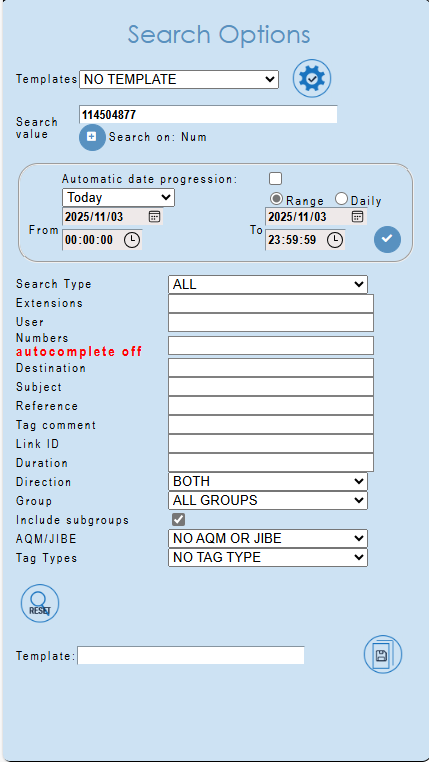
If a device is recorded and recordings not found, it can be one of 2 things:
- The supervisor does not have access.
- The search criteria used is incorrect.
- Call volume for the device is low.
More details:
-
The supervisor does not have access to the device:
The supervisor can check which devices they have access to by using this post:
How can a supervisor check the users they have access to?If the device (and user name) is not listed, then the admin supervisor or must configure the Supervisor access or update Supervisor groups. SLA clients can log a call with Datatex in the myAccount ticket system.
NOTE: iRecall: Datatex does not have the login details, supervisor access is maintained by the client.To create a supervisor login, see YouTube Instructional Video:
https://youtu.be/dxm7c7pkMVI?si=766kV91oH-c9Daj6To maintain Supervisor Groups, see YouTube Instructional Video:
https://youtu.be/AJnGfXI1R0E?si=cuBWReAlP7uHOwNM -
The search criteria used is incorrect:
To search in supervisor, see YouTube Instructional Video:
https://youtu.be/70H8sGwCVRE?si=sJbvUobQNMEhjnkFSUGGESTION:
When searching for a phone number and date range:
Use the TODAY button to clear the search criteria
Use the SEARCH VALUE and
enter the phone number without country prefix or leading zero,
for example: 114504877, instead of 0114504877 or 27114504877
Tick Number under SEARCH ON
Select the date-time. -
For possible low call volume, confirm that the user:
- used the same extension number to make phone calls
- is not on leave/training/etc.
- actually made calls - if telephone management system available, use it to confirm the calls.